
Wireless Vibration Sensors for Cooling Fans: How to Eliminate "Run-to-Failure" on Hard-to-Reach Assets
Feb 2, 2026
wireless vibration sensor for cooling fans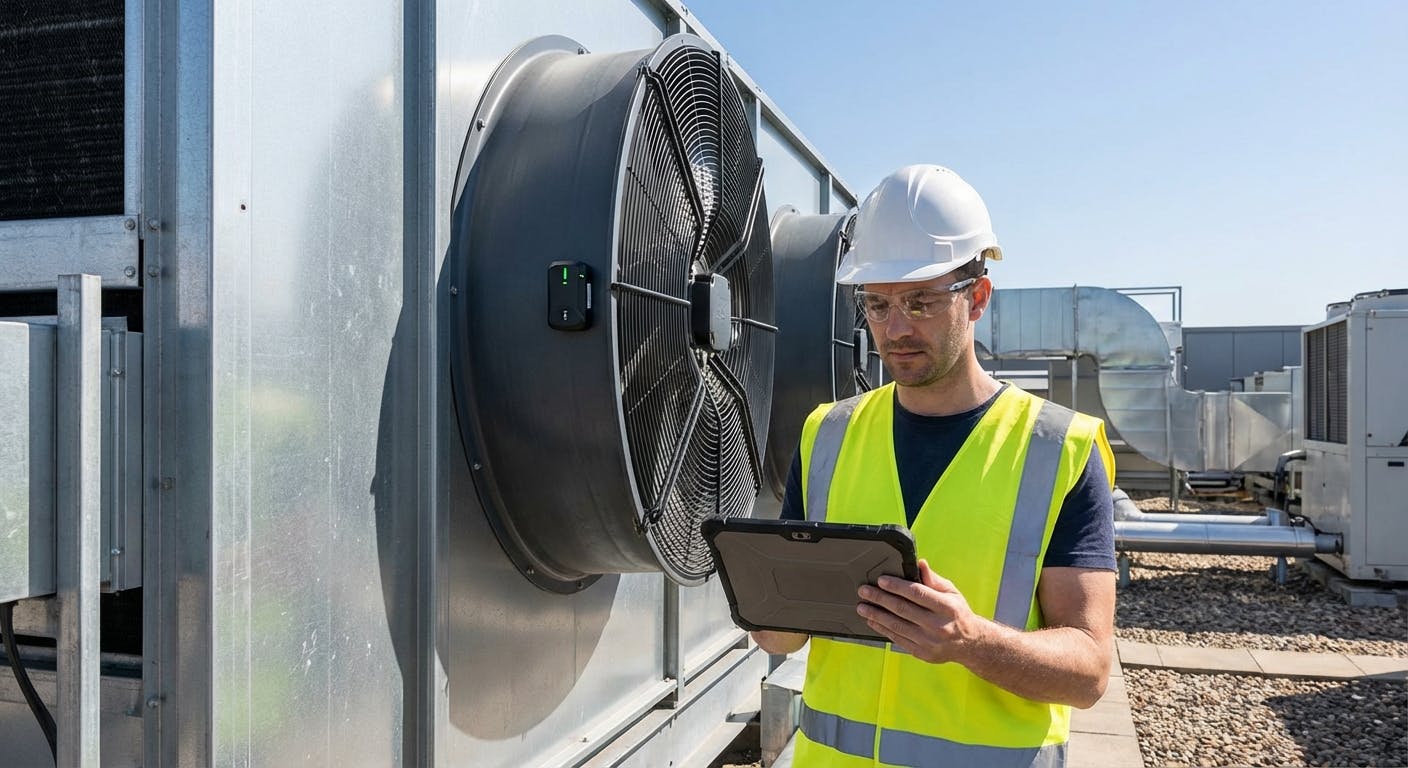
For decades, cooling fans—whether in HVAC cooling towers, industrial exhaust systems, or heat exchangers—have lived in the blind spot of reliability programs. They are critical assets; if a cooling tower fan fails, process temperature spikes, production halts, and chillers trip offline. Yet, because these fans are often located on rooftops, inside enclosed plenums, or atop slippery cooling towers, they are rarely monitored with the same rigor as floor-level pumps and motors.
The core question reliability engineers and facility managers are asking in 2026 isn't just "Can I monitor this?" but rather: "How can I deploy wireless vibration sensors to eliminate the safety risks of manual inspections while capturing the specific low-frequency data required to predict fan failure?"
The answer lies in a shift from general-purpose monitoring to application-specific deployment. Wireless vibration sensors for cooling fans are not merely data collectors; they are safety devices that bridge the gap between inaccessible assets and actionable intelligence. By utilizing modern tri-axial MEMS accelerometers with LoRaWAN or mesh connectivity, you can detect Blade Pass Frequency (BPF) anomalies, unbalance, and bearing wear months before a catastrophic failure occurs—without ever sending a technician up a ladder during operation.
This guide moves beyond the basics of "what is a sensor" to the practical engineering realities of monitoring cooling fans. We will explore sensor selection for low-speed assets, the physics of fan vibration, installation on fiberglass structures, and how to turn raw FFT data into maintenance decisions.
The "Hard-to-Reach" Paradox: Why Wireless is a Safety Requirement
The first follow-up question most facility managers ask is: "Is the investment in wireless hardware actually justified compared to our current route-based walkarounds?"
To answer this, we must look at the specific nature of cooling fan maintenance. Unlike a boiler feed pump that sits on a concrete pad at eye level, cooling fans present a "hard-to-reach" paradox.
The Accessibility vs. Reliability Trade-off
In a traditional route-based maintenance setup, a technician might visit a rooftop cooling tower once a month (or once a quarter). To take a vibration reading, they often have to:
- Climb a caged ladder with a handheld analyzer.
- Navigate a wet, slippery deck (cooling towers are notoriously hazardous environments).
- Open an access hatch while the fan is running (to get a reading on the bearing or gearbox).
- Reach past guarding to place a magnetic accelerometer.
Because this is dangerous and time-consuming, one of two things happens: either the task is skipped ("pencil-whipped"), or the interval is so long (quarterly) that a failure curve develops and peaks between visits.
The Wireless Safety Advantage
Wireless vibration sensors solve the accessibility problem permanently. By installing a sensor once (during a planned shutdown), you eliminate the need for human access during operation.
- Remote Monitoring: Data is transmitted to your CMMS or cloud dashboard, meaning the technician only climbs the tower when a fault is actually confirmed.
- Continuous Coverage: Instead of one data point every 90 days, you get readings every hour. This is critical for fans, which can go from "slight wobble" to "catastrophic blade detachment" in a matter of days if a structural crack propagates.
- Enclosed Assets: Many modern air handling units (AHUs) and plenum fans are fully enclosed. Wireless sensors allow you to monitor bearings inside the airstream without breaking the seal or shutting down the unit to install a wired probe.
If your facility has assets classified as "Confined Space" or "Working at Heights," the ROI of wireless sensors is often justified by the safety budget alone, independent of the maintenance savings.
Detecting Fan-Specific Faults: BPF, Unbalance, and Resonance
Once the decision to go wireless is made, the next technical question is: "How do these sensors detect the specific mechanical issues inherent to large fans?"
Cooling fans behave differently than pumps or compressors. They often run at lower speeds (under 1000 RPM, sometimes under 300 RPM for large tower fans), have large rotating masses, and are mounted on flexible structures. A sensor must be capable of distinguishing between normal structural movement and genuine defects.
Blade Pass Frequency (BPF)
The most critical metric for fan health is the Blade Pass Frequency. This is the frequency at which the fan blades pass a stationary point.
- Formula: $BPF = Fan RPM \times Number of Blades$
- The Symptom: A high amplitude at the BPF (and its harmonics, 2xBPF) usually indicates airflow obstruction, damper issues, or uneven blade pitch.
- The Sensor Requirement: Your wireless sensor must have high enough resolution in the frequency spectrum (FFT) to distinguish BPF from electrical line frequency or other noise.
Unbalance (1x RPM)
Fans are highly susceptible to unbalance caused by dirt buildup (mud/algae in cooling towers), blade erosion, or missing balance weights.
- The Signal: A dominant spike at exactly 1x running speed (1x RPM).
- Directionality: For overhung fans, unbalance is usually highest in the radial direction. For center-hung fans, it appears in both radial vertical and horizontal measurements. This is why a tri-axial accelerometer is non-negotiable for fans. You need to see the vibration in X, Y, and Z axes to diagnose the root cause accurately.
Structural Resonance
Cooling towers are often built of fiberglass, wood, or light steel. They are not rigid.
- The Risk: If the fan's running speed excites the natural frequency of the tower structure, vibration amplitudes will skyrocket, leading to structural fatigue.
- Detection: Wireless sensors with "coast-down" capabilities or continuous monitoring can detect if vibration spikes specifically during startup or shutdown, indicating a resonance band.
For a deeper dive into how software interprets these signals, you can explore AI-driven predictive maintenance, which automates the recognition of these spectral patterns.
Sensor Selection: Bandwidth, Sensitivity, and Mounting
A common point of failure in PdM programs is buying the wrong sensor for the application. The question here is: "What technical specifications do I need for a cooling fan sensor?"
1. Frequency Response (Low Frequency is Key)
Most standard vibration sensors are tuned for motors running at 1800 or 3600 RPM. Large cooling tower fans often run through a gearbox, with the fan shaft turning at 150-300 RPM (2.5 - 5 Hz).
- The Problem: Standard MEMS sensors often have a "high pass filter" set at 10 Hz to eliminate noise. If your fan runs at 5 Hz, a standard sensor will filter out the primary unbalance signal.
- The Solution: You must specify a wireless sensor with a frequency response starting at 0 Hz (DC) or at least 1-2 Hz. If the spec sheet says "10 Hz - 10 kHz," it is useless for the fan shaft (though still okay for the motor and gearbox input shaft).
2. MEMS vs. Piezoelectric
In 2026, MEMS (Micro-Electro-Mechanical Systems) technology has largely caught up to Piezoelectric sensors for general machinery.
- Capacitive MEMS: Excellent for low-frequency response (perfect for slow fans). They are stable and consume less power, extending battery life.
- Piezoelectric: Still superior for very high-frequency detection (like earliest stage bearing lubrication issues), but often overkill and too power-hungry for standard fan monitoring.
- Recommendation: For cooling fans, a high-quality tri-axial MEMS sensor is the industry standard.
3. Mounting on "Soft" Structures
How you mount the sensor dictates the quality of the data.
- Stud Mounting (Best): Drilling and tapping into the bearing housing. This provides the best frequency response but is difficult on thin sheet metal fan housings.
- Industrial Epoxy (Standard): For cooling towers, using a high-strength, two-part epoxy to bond the sensor mounting pad to the bearing housing or gearbox is the most common method. It transmits high frequencies better than magnets.
- Magnet Mount (Avoid): On high-vibration fans, magnets can "walk" or chatter, creating false noise in the data. Furthermore, many cooling tower components are non-ferrous (aluminum, stainless steel, fiberglass), rendering magnets useless.
Connectivity: Getting Data Out of the Concrete Canyon
Cooling fans are often located in "RF dead zones"—rooftops shielded by parapet walls, basements, or inside metal cooling towers. The natural follow-up question is: "How do we ensure the sensors stay connected?"
LoRaWAN vs. WiFi vs. Bluetooth
- WiFi: Generally a poor choice for rooftops. It requires IT infrastructure to be extended to the roof, consumes high power (draining sensor batteries), and struggles with signal penetration.
- Bluetooth (BLE): Good for "walk-by" data collection, but fails for true remote monitoring unless you have a gateway within 30-50 feet of every fan.
- LoRaWAN (Long Range Wide Area Network): The gold standard for industrial sensors in 2026. LoRaWAN operates on a sub-gigahertz frequency (915 MHz in US, 868 MHz in EU), allowing it to penetrate concrete floors and travel kilometers in open air.
- Scenario: You can place a single LoRaWAN gateway in the plant manager's office or a central utility room, and it will likely pick up sensors from the rooftop cooling towers and the basement pumps simultaneously.
Battery Life Considerations
Wireless sensors are battery-powered. To maximize life (aiming for 3-5 years):
- Set appropriate intervals: You do not need a full FFT spectrum every 10 minutes. Configure the sensor to send a simple RMS (overall vibration) value every hour, and trigger a full FFT only if the RMS breaches a threshold.
- Edge Processing: Choose sensors that process data "on the edge" (on the device itself) and only transmit the result, rather than streaming raw waveforms, which kills battery life.
Interpreting the Data: ISO Standards vs. Baselines
Once the data is flowing, the immediate question is: "What is 'bad' vibration? At what number do I shut the fan down?"
ISO 10816-3 Standards
For general industrial fans, ISO 10816-3 provides the standard severity chart. It categorizes machines based on power and foundation rigidity.
- Rigid Foundation: Fans bolted to concrete floors.
- Flexible Foundation: Fans on vibration isolators or flexible decks (most cooling towers).
Typical Alarm Thresholds (Velocity RMS in mm/s):
- Good: < 4.5 mm/s
- Satisfactory: 4.5 - 7.1 mm/s
- Unsatisfactory (Alert): 7.1 - 11.2 mm/s
- Unacceptable (Danger): > 11.2 mm/s
Note: These are general guidelines. A large, slow-moving cooling tower fan might tolerate higher vibration than a precision high-speed blower.
The Power of Baselines
While ISO standards are a good starting point, "normal" varies by machine. A fan that has run at 6.0 mm/s for five years without issue shouldn't trigger an alarm just because ISO says 4.5 is the limit.
- Trend is King: The value of wireless monitoring is the trend line. A sudden jump from 2.0 mm/s to 4.0 mm/s is far more concerning than a steady reading of 5.0 mm/s.
- Prescriptive Analytics: Modern software platforms use historical data to establish a dynamic baseline. If vibration increases in correlation with fan load, it might be normal. If it increases while load is constant, it's a defect.
- For more on how software handles these thresholds, review our guide on prescriptive maintenance.
Integration: From Sensor to Work Order
Data without action is just noise. The final operational question is: "How does this sensor data actually trigger a repair?"
In a mature reliability ecosystem, the wireless sensor should not just dump data into a siloed dashboard. It must integrate with your Computerized Maintenance Management System (CMMS).
The Automated Workflow
- Event: The wireless sensor on Cooling Tower 3 detects a rise in 1x RPM vibration (unbalance) exceeding the 7.5 mm/s threshold.
- Validation: The system waits for 3 consecutive readings above the threshold to rule out a transient shock (like a bird strike or wind gust).
- Trigger: The PdM software sends an API call to the CMMS.
- Action: A Work Order is automatically generated: "Inspect Cooling Tower 3 Fan for Unbalance/Blade Debris. Priority: High."
- Notification: The maintenance lead receives a push notification on their mobile device.
This automation removes the "analysis paralysis" where data sits unread in a portal. It turns vibration readings directly into maintenance tasks.
Integration with Asset Management
Linking sensors to your asset management records allows you to track the lifecycle cost of the fan. You can correlate vibration spikes with specific bearing brands or blade manufacturers, helping you make better procurement decisions in the future.
ROI Calculation: The Cost of Fan Failure
When presenting this to leadership, you will be asked: "What is the return on investment?"
Do not just calculate the cost of the sensor vs. the cost of a bearing. The real cost is downtime and collateral damage.
The "Catastrophic" Scenario
If a cooling tower fan blade detaches due to undetected fatigue (which would have been visible in the vibration spectrum):
- Direct Repair: Replacement of fan assembly, gearbox, and potentially the motor ($15,000 - $50,000).
- Structural Damage: Destruction of the fan stack and fill media ($20,000+).
- Crane Rental: Required to lift new parts to the roof ($5,000/day).
- Production Loss: If the cooling tower supports a critical process (e.g., data center cooling, chemical reactor, injection molding), the cost of downtime can range from $10,000 to $100,000 per hour.
The Wireless Solution Cost
- Sensor Cost: ~$300 - $600 per sensor (one-time).
- Subscription: ~$5 - $15 per month/sensor.
- Installation: 1 hour of labor.
If the sensor prevents even one catastrophic failure or extends the life of a gearbox by six months through early intervention (e.g., aligning a shaft before it destroys the bearing), the ROI is typically achieved within the first 6 months.
For a broader look at how to calculate these savings across different asset types, consider reading about predictive maintenance for bearings, as bearings are the most common failure point in fan assemblies.
Conclusion: Start with the Critical Few
You do not need to sensor every bathroom exhaust fan in your facility. Start with the "Critical Few"—the cooling towers and large supply fans that, if they failed, would stop production or create a safety hazard.
Wireless vibration sensors for cooling fans are a mature technology in 2026. They offer a rare win-win: they improve the safety of your maintenance team by keeping them off rooftops, and they improve the reliability of your facility by catching faults that manual rounds miss.
Ready to modernize your fan monitoring strategy? Don't let your critical assets run to failure. Explore how MaintainX's CMMS software integrates with top-tier wireless sensors to turn vibration data into automated, actionable work orders today.
