
AI Robots in Maintenance: A Technical Implementation Guide for 2026
Feb 13, 2026
ai robots maintenance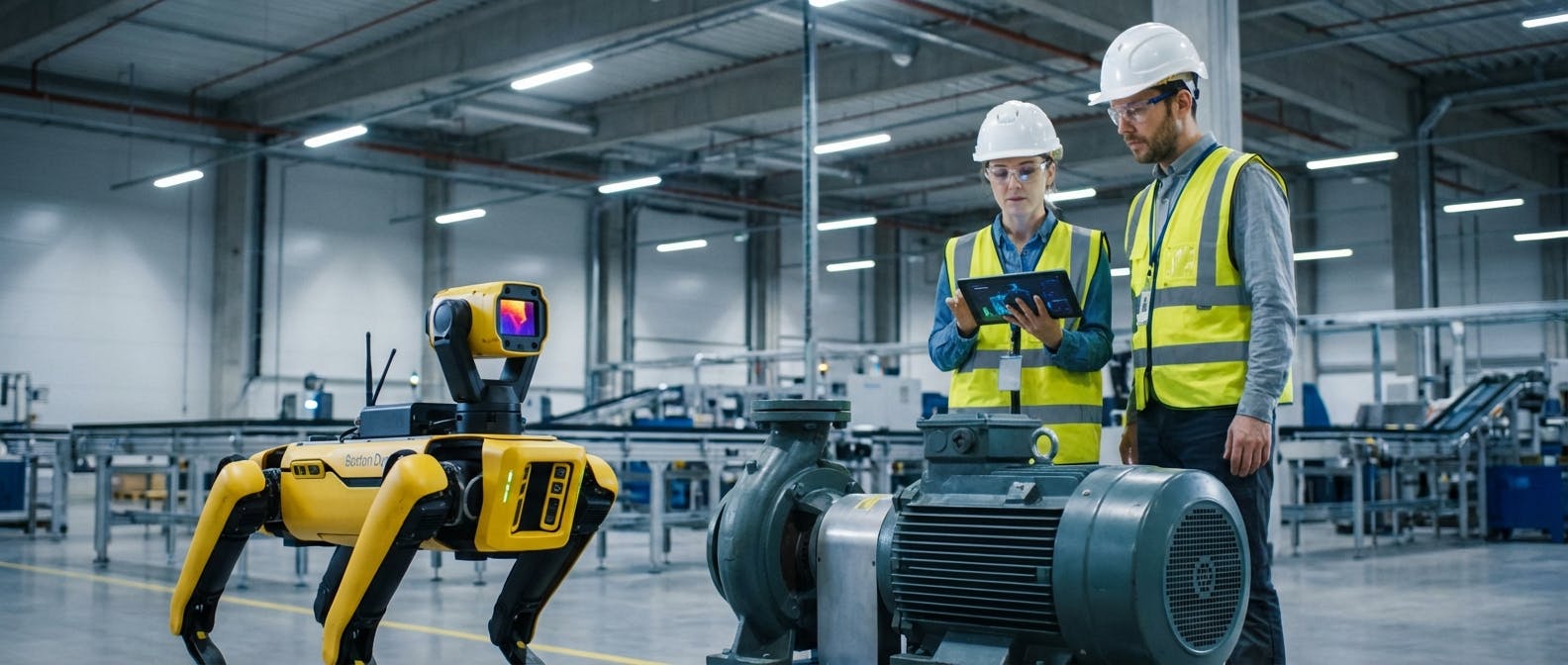
The conversation around AI and robotics in manufacturing has shifted. In 2026, we are no longer asking if robots have a place on the shop floor; we are asking how to integrate them into the reliability strategy without creating a new layer of operational chaos.
When maintenance leaders search for "AI robots maintenance," they are usually trying to solve a two-sided equation:
- Robots as Inspectors: How do I use Autonomous Mobile Robots (AMRs) and drones to perform condition monitoring and predictive maintenance (PdM)?
- Robots as Assets: How do I maintain these sophisticated, expensive robotic units to ensure they don't become a liability?
The answer lies in treating AI robotics not as a novelty, but as a high-criticality asset class that serves as a force multiplier for your human technicians. This guide provides the technical framework for implementing robotic maintenance inspections and establishing the Preventive Maintenance (PM) procedures required to keep the robots themselves operational.
How do AI robots actually perform predictive maintenance tasks?
The first half of the equation is utilizing robotics to automate data collection. By 2026, the standard practice has moved beyond static sensors to dynamic, mobile sensing. But how does this work in a practical, industrial environment?
The Sensor Payload and Data Ingestion
A robot is simply a delivery vehicle for sensors. Whether it is a quadruped (like the descendants of Boston Dynamics’ Spot) navigating stairs or a wheeled AMR patrolling a flat warehouse floor, the value lies in the payload.
To implement this effectively, you must map specific robot capabilities to failure modes:
- Thermal Anomaly Detection: Robots equipped with radiometric thermal cameras patrol switchgear and motor control centers. Unlike a human using a handheld gun once a quarter, the robot scans the same assets daily.
- Thresholds: The AI should be programmed to flag a delta-T (temperature difference) greater than 5°C between phases or a rise of 10°C above baseline.
- Application: This is critical for predictive maintenance on motors where overheating is a leading indicator of insulation failure.
- Acoustic Imaging: Air leaks and partial discharge emit high-frequency sounds inaudible to humans. Robots equipped with ultrasonic arrays can pinpoint leaks in compressed air lines with 95% accuracy.
- ROI Context: A 3mm leak at 7 bar pressure costs roughly $1,500/year. A robot finding 20 of these pays for its monthly lease.
- Vibration Analysis (Route-Based): While fixed wireless sensors are best for critical assets, they are too expensive for balance-of-plant equipment. Robots can extend a robotic arm with an accelerometer to touch pre-marked test points on pumps and fans.
- Data Quality: The robot ensures consistent probe placement and pressure, eliminating the "human variance" often seen in manual vibration routes.
Decision Framework: Robot vs. Fixed Sensor vs. Human
Before deploying a robot, it is vital to understand where it fits in the P-F curve ecosystem compared to other methods. Use this decision matrix to allocate resources effectively:
| Feature | Fixed Wireless Sensors | Mobile Robots (AMRs) | Manual Route (Human) |
|---|---|---|---|
| Data Frequency | Continuous (Seconds/Minutes) | Periodic (Daily/Shift) | Infrequent (Monthly/Quarterly) |
| Cost Structure | High CapEx (Hardware per asset) | Low Marginal Cost (One robot, 1000+ assets) | High OpEx (Recurring Labor hours) |
| Coverage Area | Single Point (1:1 ratio) | Wide Area / Multi-Asset (1:Many ratio) | Flexible / Intuitive |
| Best Use Case | Critical Assets (Turbines, Main Drives) inside guarding. | Balance of Plant (Pumps, Steam Traps, Conveyors) spread over large distances. | Complex Diagnostics, Repair, and Lubrication tasks. |
Strategic Insight: Do not use robots to monitor your most critical asset that requires sub-second data resolution; use fixed sensors for that. Use robots to cover the "middle 60%" of your assets—the equipment that is too numerous to sensorize individually but too critical to ignore for months at a time.
Navigation and Autonomy (SLAM)
For a robot to perform maintenance, it must navigate without constant supervision. This relies on Simultaneous Localization and Mapping (SLAM).
- LiDAR Mapping: The robot builds a 3D point cloud of your facility.
- Change Detection: Advanced AI compares today’s scan with yesterday’s. If a pallet is blocking a walkway or a safety guard is missing, the robot flags it as an anomaly.
Implementation Tip: Do not attempt to deploy robots in "unstructured" environments immediately. Start with "semi-structured" zones like aisles and perimeter fences before moving to complex assembly cells.
The 90-Day Pilot Framework
To ensure success and avoid "pilot purgatory," structure your initial deployment in three distinct phases:
- Days 1-30 (Data Validation): Run the robot alongside human technicians. Do not trust the robot's alerts yet. Compare the robot's thermal readings against a calibrated handheld Fluke camera. Calibrate emissivity settings for your specific environment and surface materials.
- Days 31-60 (Integration Testing): Connect the robot to a sandbox environment of your CMMS. Test the "Store and Forward" capabilities during Wi-Fi outages. Ensure the robot can open automatic doors or navigate elevators if required.
- Days 61-90 (Autonomous Operation): Remove human shadowing. Allow the robot to generate "Draft" work orders. Measure the "Time to Complete Route" and optimize the path to reduce battery consumption.
What is the specific maintenance schedule for the robots themselves?
This is the section most generic guides miss. If you deploy a fleet of five inspection robots, you have just added five complex electromechanical assets to your asset management registry. If you do not maintain the maintainer, your program will fail.
Robots are not "set it and forget it." They require rigorous PMs. Below is a standard maintenance schedule for an industrial quadruped or heavy-duty AMR operating in a manufacturing environment.
Daily Checks (Operator Level)
- Optical Cleaning: Wipe down LiDAR lenses, depth cameras, and thermal sensors with microfiber and approved solution. Dust accumulation of just 5% on a LiDAR lens can cause navigation failures (phantom obstacles).
- Battery Inspection: Check physical connectors for arcing or corrosion. Ensure the charging dock contacts are clean.
- E-Stop Functionality: Physically test the emergency stop button to ensure it cuts power to the servos immediately.
Monthly PMs (Technician Level)
- Joint/Servo Calibration: For articulated robots, check joint zero-positions. A drift of >0.5 degrees can affect the robot's ability to climb stairs or manipulate tools.
- Filter Replacement: Most industrial robots have active cooling for their onboard compute (NVIDIA Jetson or similar modules). Clean or replace intake filters to prevent thermal throttling of the AI processor.
- Tire/Tread Wear: Check for embedded debris (metal shavings) in wheels or footpads. Uneven wear affects odometry, causing the robot to get lost.
- Battery Thermal Management: Industrial robots often charge at high currents (20A+). Monitor the battery temperature logs during the charge cycle. If the battery temp exceeds 45°C during charging, the Battery Management System (BMS) will throttle the charge rate, effectively doubling your downtime. Ensure charging docks are placed in ventilated areas, not tucked into hot mechanical closets.
Semi-Annual/Annual PMs (OEM or Specialist)
- Internal Harness Inspection: Robots vibrate. Internal cabling can chafe. Inspect high-flex cables for insulation damage.
- Gearbox Lubrication: Harmonic drives and planetary gears in robotic joints have specific grease intervals (often every 2,000 to 4,000 hours of operation).
- Battery Capacity Test: If the battery State of Health (SoH) drops below 80%, the robot’s range will no longer match its programmed inspection routes. Plan for replacement.
How do we integrate robotic data into our existing CMMS?
The most common failure mode in AI robotics projects is data silos. If the robot detects an overheating bearing but the alert sits in a proprietary dashboard that no one checks, the asset will still fail.
You must integrate the robotic software with your Computerized Maintenance Management System (CMMS).
The API Handshake
Your robot's control software (e.g., Boston Dynamics' Orbit, generic ROS 2 interfaces) must talk to your CMMS via API.
- Trigger Event: Robot thermal camera detects Motor A temp > 80°C.
- Data Sanitation: The AI validates the reading (checks if the robot was stationary and the target was in focus).
- Work Order Generation: The system automatically pushes a work order to your CMMS software.
- Subject: "High Temp Alert - Motor A"
- Description: "Robot detected 82°C. Thermal image attached."
- Priority: High.
Handling False Positives
To avoid "alert fatigue," do not set the robot to auto-generate work orders for every anomaly immediately.
- Phase 1 (Learning): Have the robot send alerts to a "Review Queue" where a reliability engineer approves them.
- Phase 2 (Trusted): Once the AI proves accurate, enable auto-creation for critical thresholds.
- Phase 3 (Prescriptive): Use prescriptive maintenance logic. If the robot detects high vibration, the system doesn't just say "Fix it," it suggests "Check coupling alignment and lubricate."
What is the ROI calculation and cost structure?
Robots are expensive. Justifying the CapEx requires a clear calculation of Total Cost of Ownership (TCO) versus the Cost of Unplanned Downtime (CoDT).
The Cost Structure (2026 Estimates)
- Hardware: An industrial-grade quadruped with a full sensor payload (thermal + acoustic + LiDAR) costs between $90,000 and $130,000.
- Software/Licensing: Fleet management software often runs $5,000 - $10,000 per robot annually.
- Maintenance: Budget 10-15% of the hardware cost annually for parts, batteries, and service contracts.
The ROI Math
To get the ROI positive, you cannot look at labor savings alone. Robots rarely replace technicians; they reallocate them. The ROI comes from asset uptime.
- Scenario: A conveyor motor fails on a bottling line.
- Downtime Cost: $20,000 per hour.
- Repair Time: 4 hours.
- Total Loss: $80,000.
- Robotic Intervention:
- The robot inspects the conveyor bearings nightly.
- It detects a vibration increase 3 weeks before failure.
- Maintenance replaces the bearing during a scheduled changeover.
- Cost: $500 (part) + $200 (labor).
- Savings: $79,300.
Conclusion: One "save" on a critical asset often pays for the robot. If your facility has high downtime costs, the ROI period is typically 6-12 months.
What are the safety and compliance requirements?
Bringing autonomous machines into spaces shared with humans introduces new safety risks. You must adhere to specific standards to ensure compliance.
Key Standards
- ISO 10218-1/2: Safety requirements for industrial robots.
- ISO/TS 15066: Specifications for collaborative robots (cobots). This defines the force and speed limits a robot must adhere to when humans are detected nearby.
- ANSI/RIA R15.08: The standard specifically for Industrial Mobile Robots (IMRs). This is the "bible" for AMR safety in warehouses.
Cyber-Physical Security
In 2026, a hacked robot is a physical weapon or a spy.
- Network Segmentation: Robots should operate on a dedicated OT (Operational Technology) VLAN, air-gapped from the corporate IT network and the public internet where possible.
- Encryption: Ensure all data transmission between the robot and the server is encrypted (TLS 1.3 or higher).
- Access Control: Use strict Role-Based Access Control (RBAC). Only certified personnel should be able to teleoperate or alter the robot's programming.
For deeper reading on industrial control systems security, refer to the NIST Guide to Industrial Control Systems (ICS) Security.
How do we handle the skills gap and training?
A common fear is that robots will devalue human workers. The reality is that robots require more skilled humans, just in different areas. You need to transition your team from "Route Walkers" to "Robot Handlers."
The "Robot Operations" Role
Create a new designation within your maintenance team. This person is responsible for:
- Mission Planning: Setting up the inspection routes in the software.
- Exception Handling: Rescuing the robot when it gets stuck or confused.
- Data Interpretation: Analyzing the thermal/acoustic images the robot captures.
Upskilling Strategy
Don't hire new PhDs; train your best mechanics. They know the facility.
- Phase 1: Train them on the safety protocols and basic controls.
- Phase 2: Train them on the mobile CMMS interface where robot data appears.
- Phase 3: Certification in thermography or vibration analysis. The robot gathers the data, but the human must certify the diagnosis.
Troubleshooting: What happens when the AI gets it wrong?
No AI is perfect. In an industrial environment, environmental factors will mess with your robots. Here are the most common edge cases and how to solve them.
1. The "Fog" of Manufacturing
Dust, steam, and oil mist can blind LiDAR and cameras.
- Symptom: Robot stops constantly, detecting "ghost" obstacles.
- Solution: Adjust the "sensitivity bubble" in the navigation software. Use multi-modal sensing (sonar + LiDAR) so the robot can cross-reference data. If LiDAR sees a wall but sonar sees nothing, the AI can determine it's likely steam or dust.
2. Wi-Fi Dead Zones
AMRs rely on connectivity to offload data and receive commands.
- Symptom: Robot completes the mission but data doesn't appear in the dashboard until hours later (or is lost).
- Solution: Implement "Store and Forward" architecture. The robot must have enough onboard storage to hold a full shift's worth of 4K video and thermal data, uploading it only when it returns to a strong signal zone (usually the charging dock).
3. Dynamic Environment Changes
If you move a pallet rack or install a new machine, the robot's map becomes obsolete.
- Symptom: Robot spins in circles or refuses to enter an area.
- Solution: Schedule a "Mapping Run" after any facility layout change. Modern robots use "Continuous Mapping" to update their world view, but major changes still require a manual map reset to ensure path optimization.
4. Data Overload and Storage Paralysis
A common pitfall is configuring the robot to save everything. A single robot recording 4K video and thermal streams can generate terabytes of data per week, overwhelming local servers and cloud storage budgets.
- Symptom: Slow dashboard performance, high cloud storage fees, and difficulty finding relevant data.
- Solution: Configure "Exception-Based Recording." The robot should process data at the edge (onboard) and only upload images or clips when a threshold is breached (e.g., only save the thermal image if the temp is >60°C). For normal readings, simply log the numerical value and discard the heavy media files.
Summary
AI robots in maintenance are a powerful lever for reliability, but they are not magic. They are tools that require their own maintenance strategies, integration workflows, and skilled operators. By treating them with the same rigor as your production assets—utilizing proper PM procedures and data integration—you can transition from reactive firefighting to a truly autonomous reliability strategy.
